PaywallProject 4.0 is here and focuses on three things: more paying readers, less admin work for your staff, and a way to stop AI companies from training on your stories.
Here’s a quick summary of what changed:
- Grow revenue: coupons that discount recurring payments, free plans for schools and employers, and plans in place of the free sign-up form on the posts you choose.
- Keep readers: Newsletter Glue sync, newsletter preferences in My Account, and profile photos.
- Protect your content: AI Shield turns away AI crawlers while Google keeps indexing your site.
- Simpler payments: Connect with Stripe is now the one way to take payments.
Grow revenue
Coupons that last longer than one payment
Until now, a coupon only took money off the first payment. Now you choose how long the discount runs: the first payment only, a set number of months, or every payment.
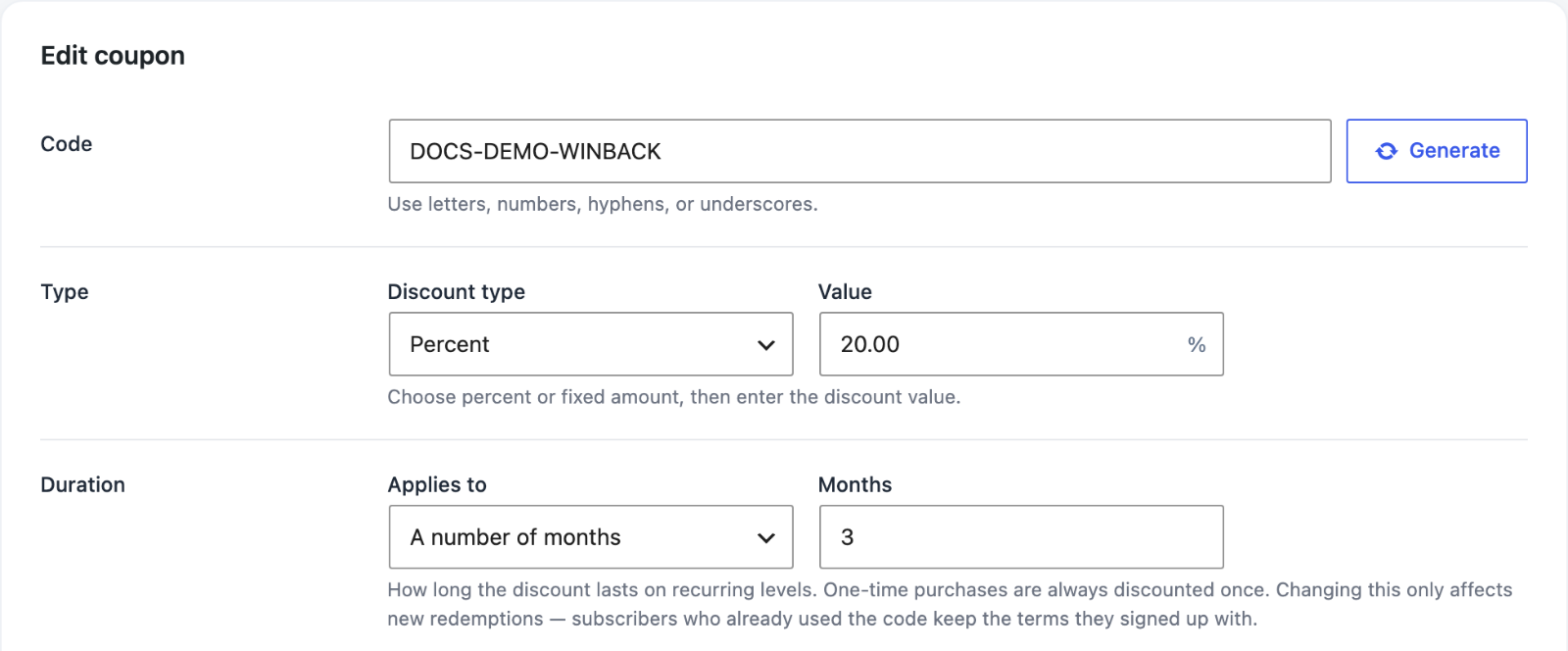
That opens up offers like “half price for three months” or a lasting rate for founding subscribers. Your existing coupons don’t change. They keep discounting the first payment only. When you edit a coupon, the change applies to the next checkout or plan change. How to create and share coupons.
Free plans for schools, employers and associations
In 3.1 you could give a paid plan free of charge to everyone with an email address at a listed domain, such as a university or a local employer. In 4.0, email domains can restrict free plans too.
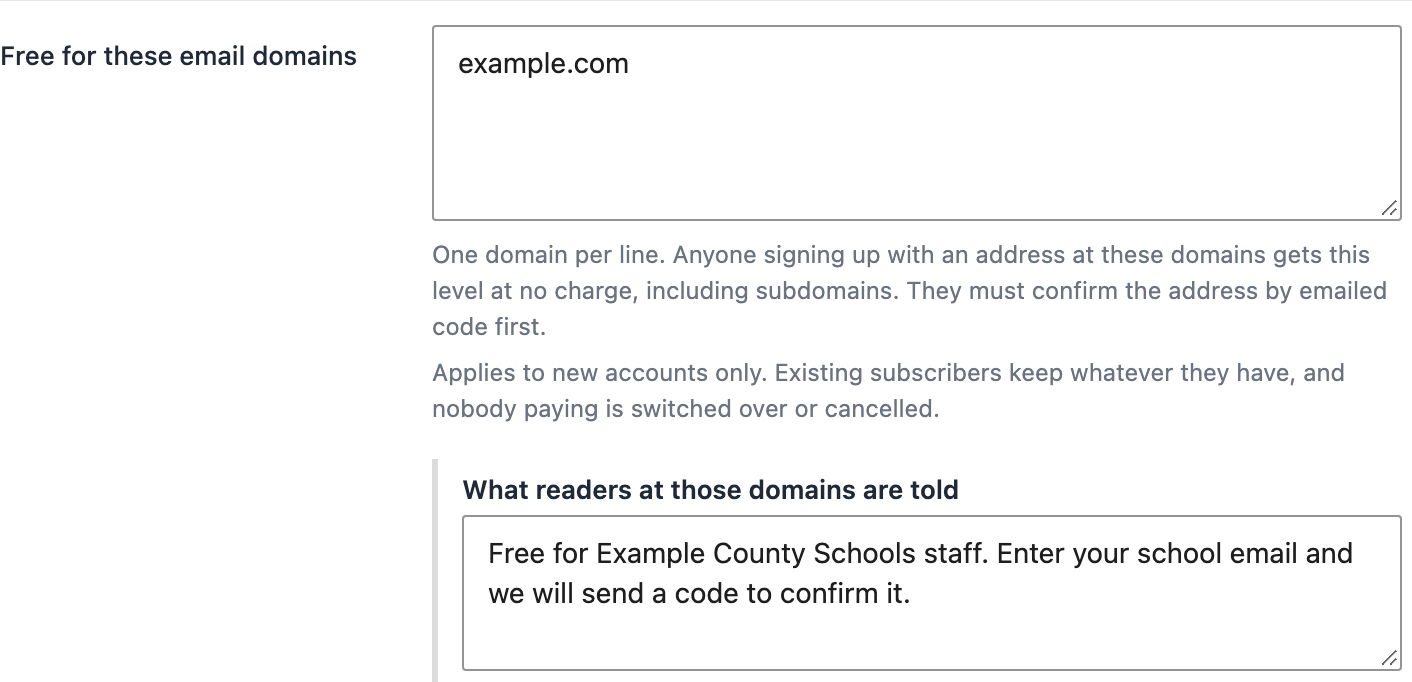
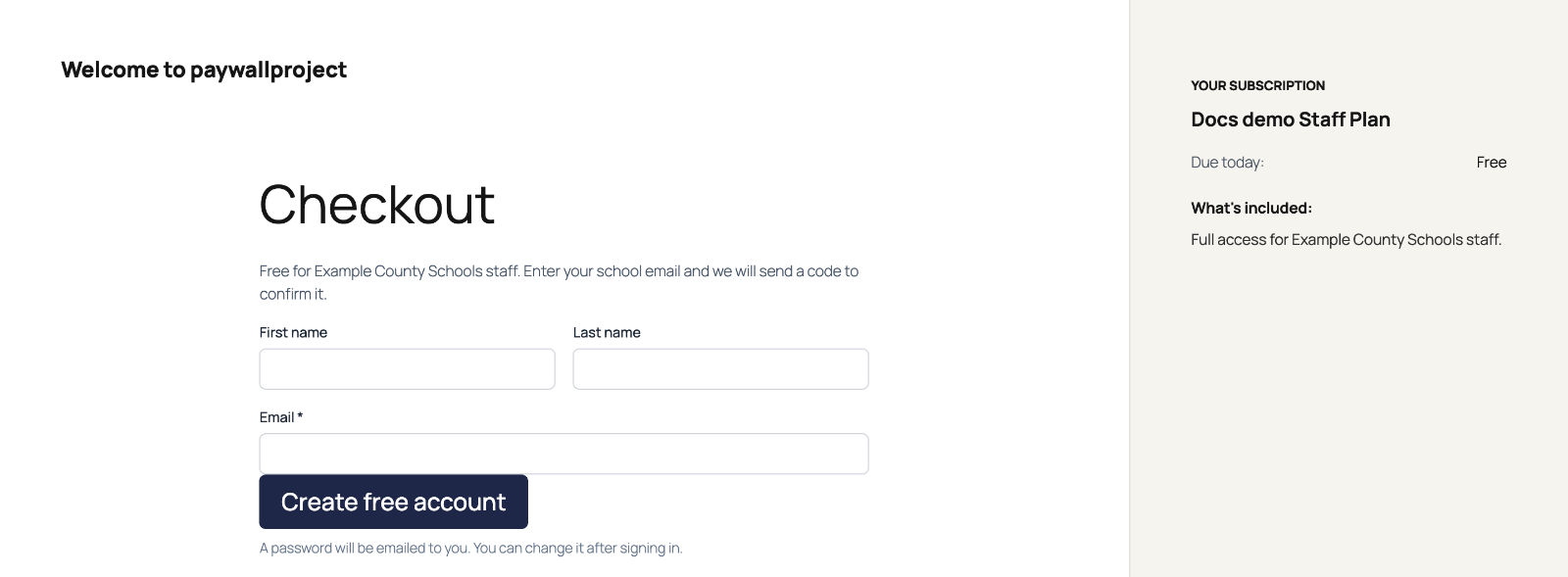
Each restricted plan can also say who it’s for, like “Free for Meeker School District staff.” Readers verify their address with a one-time code before they get access. Free plans now use your site’s checkout layout as well, including the standalone checkout. Give free access by email domain.
Show plans instead of the free sign-up form
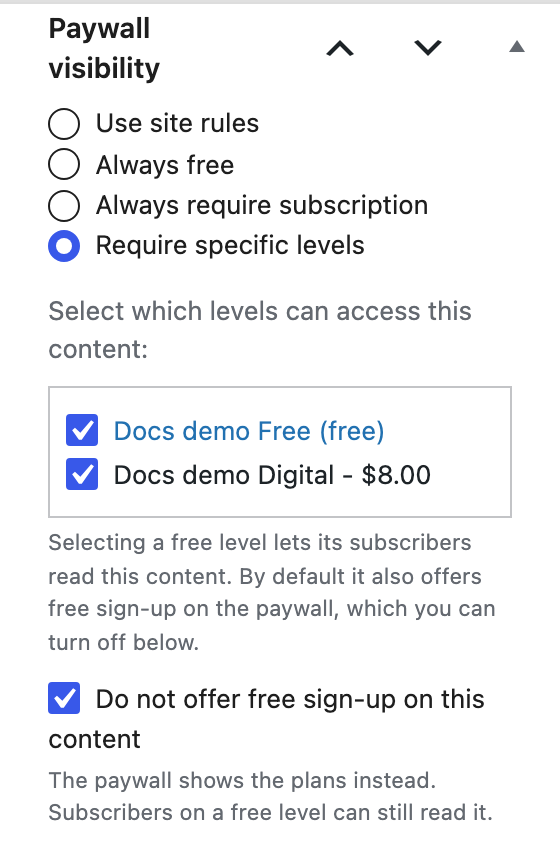
Some stories are worth more than an email address. On a post that names a free level, you can now turn off the free sign-up form on its paywall and show your paid plans instead. Readers already on the free level can still read it. Use it on your strongest work, where readers are most ready to pay. Show plans instead of the free sign-up form.
Keep readers
Newsletter Glue sync
Your newsletter list now stays in step with your paywall. When a reader subscribes, changes plan or lapses, their newsletter contact follows, so you can write to paying readers and lapsed readers separately.
Fully managed by PaywallProject? We already keep your list in sync for you, so there’s nothing to set up.
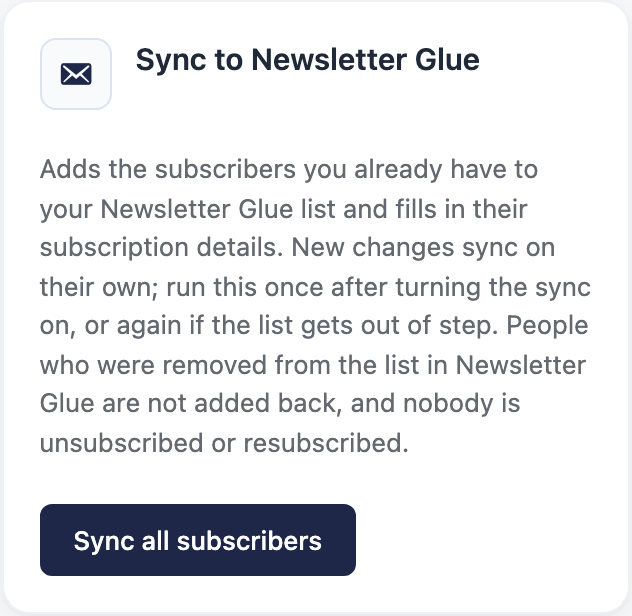
Running PaywallProject on your own hosting? If you send your newsletter with Newsletter Glue through its own email service, you can now turn the sync on yourself. Each contact carries their status, access, plan and expiry date as custom fields, and ready-made “has access” and “no access” segments let you write to each group. The sync never unsubscribes anyone, and a card in Tools adds your existing subscribers in one go. It’s off until you turn it on. Sync subscribers to Newsletter Glue.
Newsletter choices in My Account
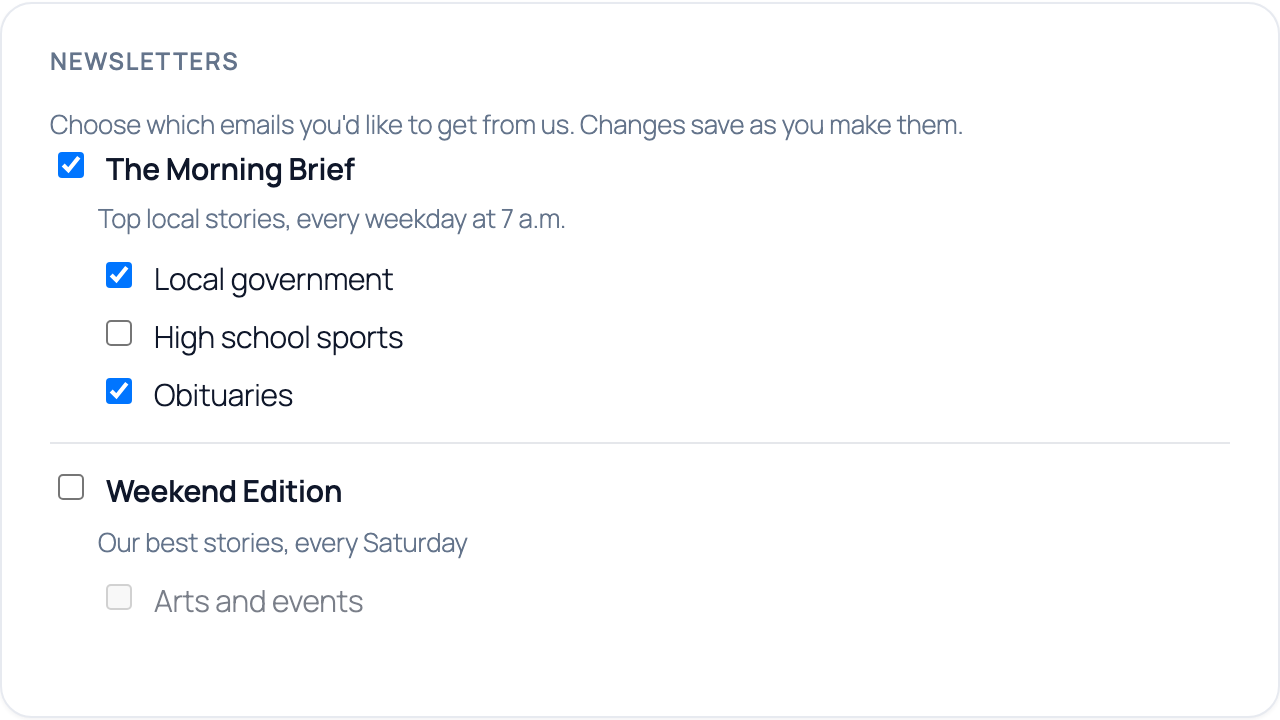
Readers get a new Newsletters card in My Account. They can join and leave your newsletters and topics themselves, without emailing your staff to do it. On your own hosting, the card appears once the Newsletter Glue sync is on.
Profile photos
Subscribers can upload, change or remove a profile photo on the My Account page. It becomes their avatar across your site. Subscriber profile photos.

Protect your content
AI Shield
AI companies crawl local news sites to train their models and to answer questions in place of a click. AI Shield is a new tab under Settings. It adds robots.txt rules that turn away AI training crawlers and AI search fetchers. Google, Bing and other search engines keep indexing your site.
- You choose the bots. Pick which crawlers to block, one by one.
- It covers cached pages. If a CDN serves some pages before WordPress sees the request, copy the ready-made Cloudflare WAF rule from the tab.
- It warns you about gaps. The tab tells you when a physical robots.txt file or an SEO plugin’s rules still let a blocked crawler in.
AI Shield is off by default. Learn more about AI Shield, or read our guide on how to block AI bots without blocking Google.
Simpler payments
Connect with Stripe is now the one way to take payments. The fields for pasting your own Stripe keys and the webhook setup button are gone from Settings. New sites connect their Stripe account directly, with no keys to copy. Connecting sets up the webhook for you.

Already charging with stored keys? Your site keeps working. You don’t need to do anything. Connecting Stripe to PaywallProject.
Checkout is also safer for your readers. It now refuses a purchase of a plan the subscriber already holds, so nobody pays twice for the same period. A Stripe key saved in the wrong mode is refused too, so a site in test mode can never charge a real card.
Also improved
- A webhook for plan changes. PaywallProject now sends a
subscriber.plan_changedevent when a subscriber upgrades or downgrades, from the admin, My Account or Stripe. It carries both the old and new plan, so Zapier, Make or Pabbly can act on it. Send events to Zapier, Make, Pabbly or your own endpoint. - Security hardening in 4.0.1. Finishing a free signup now requires the verified one-time code. We removed an endpoint that revealed whether an email address has an account. We also hardened 3-D Secure checkout and how logged-in members’ requests are checked. How the free registration funnel works.
- A full code review. Every public route, admin form and database query is now checked, sanitized and escaped, following the WordPress.org plugin review. PaywallProject is tested up to WordPress 7.1.
- Fixes. The Newsletter Glue “Sync all subscribers” button in Tools no longer crashes. Recurring pay-what-you-want levels with no Stripe product now check out correctly.
How to update
If PaywallProject hosts your site, you already have 4.0.1. We update hosted sites for you.
Running PaywallProject on your own hosting? In your WordPress dashboard, go to Dashboard → Updates and update PaywallProject to 4.0.1. AI Shield and the Newsletter Glue sync stay off until you turn them on. The full list of changes is on the changelog.
New to PaywallProject? It’s the managed WordPress paywall for local news, set up and run by our team. Get started or book a 30-minute call.